Fix Edge Repeatedly Asking for Credentials
Published: 2021-02-23
Are you accessing an application hosted on IIS with Windows Authentication enabled, but Microsoft Edge or Internet Explorer keeps prompting you for credentials?
Interestingly, other browsers might work just fine. You enter your username and password, and you are logged in. But with Edge or Internet Explorer, the credential prompt keeps appearing in a loop, and you can never get into the application.
If you are experiencing this issue, the problem might be related to how Windows Authentication is negotiated between the browser and IIS.
Let’s start with the solutions
I’ll start with the solutions and then explain why this happens.
Solution 1: Remove the Negotiate provider from IIS
This solution addresses the issue on the server side, so you don’t have to make changes on individual client machines.
-
Open IIS Manager.
- Press
Windows + R, typeinetmgr, and press Enter. - Alternatively, search for IIS or inetmgr from the Windows Start menu.
- Press
-
Expand Sites under your server node and select your web application.
-
In the Features View, locate and double-click Authentication.
-
Select Windows Authentication.
-
In the Actions pane, click Providers….
-
Under Enabled Providers, select Negotiate and click Remove.
-
Restart the application or recycle its application pool.

With this change, IIS will use NTLM instead of Negotiate for Windows Authentication.
Note: Removing Negotiate disables Kerberos negotiation for this application. Consider the implications if your application depends on Kerberos, especially for scenarios involving delegation or the double-hop problem.
Solution 2: Disable Negotiate on the client machine
This is not the preferred solution because it requires changes on every affected client machine. However, it is another option worth mentioning.
-
Open Registry Editor on the client machine (
regedit). -
Navigate to the following registry key:
HKEY_CURRENT_USER\Software\Microsoft\Windows\CurrentVersion\Internet Settings -
Locate the
EnableNegotiateentry in the right-hand pane. -
Right-click EnableNegotiate, select Modify, and change Value data to
0. -
Restart the browser or sign out and back in to apply the change.
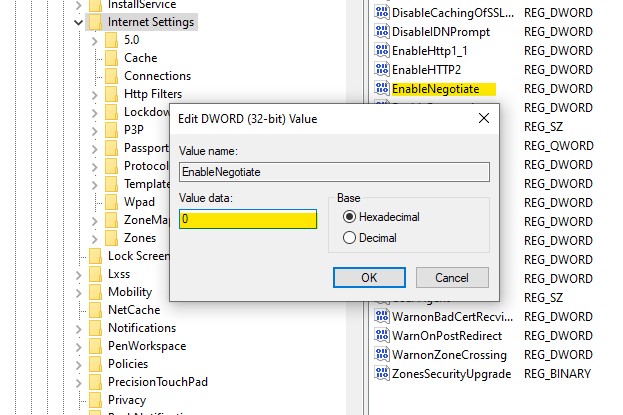
Either solution may resolve the repeated credential prompt, depending on your environment and authentication configuration.
Why does Edge or Internet Explorer keep asking for credentials?
Now that we have covered the possible solutions, let’s understand why Edge and Internet Explorer can fail to authenticate when other browsers work fine.
For intranet applications hosted on IIS, Integrated Windows Authentication (IWA) is generally a good choice. It allows users to authenticate using their Windows credentials without repeatedly entering their username and password.
Two authentication providers commonly encountered in this setup are:
- Negotiate: Negotiates the authentication mechanism between the client and server. It typically selects Kerberos when the environment supports it and can fall back to NTLM.
- NTLM (New Technology LAN Manager): An authentication protocol that does not require the client machine to be joined to an Active Directory domain, although the server must be configured appropriately for the authentication scenario.
AD DC: Active Directory Domain Controller.
You can learn more about these authentication mechanisms in Microsoft’s documentation: Windows Authentication <windowsAuthentication>.
What happens when the browser accesses an IIS application?
When you access an application protected by Windows Authentication, IIS challenges the browser to authenticate.
For example, if both Negotiate and NTLM are enabled in IIS, the server can advertise both authentication options in its HTTP response headers.
You can inspect these headers using the browser’s Developer Tools (Network tab).

You might see response headers similar to these:
WWW-Authenticate: Negotiate
WWW-Authenticate: NTLM
By default, Edge and Internet Explorer generally prefer Negotiate over NTLM when both are available.
This is where the problem can occur.
If the client and server cannot successfully complete the authentication mechanism selected through Negotiate, authentication fails. IIS sends another authentication challenge, and the browser may continue prompting for credentials.
For example, this can happen when Kerberos authentication cannot be established because of domain configuration, SPN, or other authentication-related issues.
Removing Negotiate from the IIS configuration eliminates that negotiation path. IIS advertises NTLM instead, allowing the browser to authenticate using NTLM.
Similarly, disabling Negotiate on the client machine prevents the browser from using that provider, so it can use NTLM when IIS offers both options.
Conclusion
If Edge or Internet Explorer repeatedly prompts for credentials when accessing an IIS application protected by Windows Authentication, check the authentication providers configured in IIS.
Removing Negotiate and allowing NTLM may resolve the issue without requiring changes to individual client machines.
However, remember that Negotiate is important for Kerberos authentication. Before disabling it in a production environment, verify that doing so won’t affect applications that rely on Kerberos, delegation, or other Kerberos-specific capabilities.